
What AI Actually Does Inside CAD: A Manufacturing Engineer's Guide
Most engineers hear "AI in CAD" and picture generative design: beautiful topology-optimized lattices that look like they belong in an aerospace brochure. That is one of four distinct things AI is actually doing inside modern CAD environments. The other three are less photogenic and considerably more useful to the average manufacturing engineer dealing with real parts, real tolerances, and a real production floor.




Ask a senior engineer at most mid-size manufacturers what slows down the design-to-production cycle and the answer is rarely the CAD tool itself. It is everything around it: the time spent searching for a part that almost certainly already exists somewhere in the vault, the late-stage engineering change order that surfaces a manufacturability problem that was visible in the model three weeks earlier, the compliance check that happens at the end of the process instead of the beginning. AI inside CAD is addressing these problems. Generative design gets the attention; part reuse, early issue detection, and embedded compliance intelligence are where the daily time savings actually live.
There are four distinct things AI is doing inside modern CAD environments in 2026. They serve different problems, involve different workflows, and deliver different kinds of value. Understanding which one applies to your situation matters more than picking a software brand.
Four Things AI Does Inside CAD (and Which One You Actually Need)
The marketing around AI CAD tools tends to collapse all four into "generative design," which makes it harder to evaluate what any given tool actually does. A clearer breakdown:
The honest caveat on generative design: Most mechanical engineering work does not start from a blank design space. A senior engineer at a mid-size manufacturer observed that 70% of the parts his team "designs" each year are functionally identical to parts designed two or three years earlier. For that 70%, AI part search delivers faster ROI than generative design, with far less setup required.
Generative Design: What It Actually Delivers on the Factory Floor
Generative design uses AI optimization to explore hundreds or thousands of design configurations simultaneously, against constraints defined by the engineer: load cases, material limits, manufacturing method, weight targets, cost bounds. The engineer does not get one answer; they get a range of viable options ranked against the defined criteria. Their job shifts from building geometry to selecting and refining from AI-generated alternatives.
The documented outcomes are real. Generative design reduces part design time by 80 to 95 percent, from weeks to hours in documented deployments, with AI-optimized designs achieving 30 to 60 percent weight reduction while maintaining or increasing strength. Material savings of 25 to 45 percent per part translate to meaningful annual savings at volume. The payback period for the tooling investment is typically three to six months.
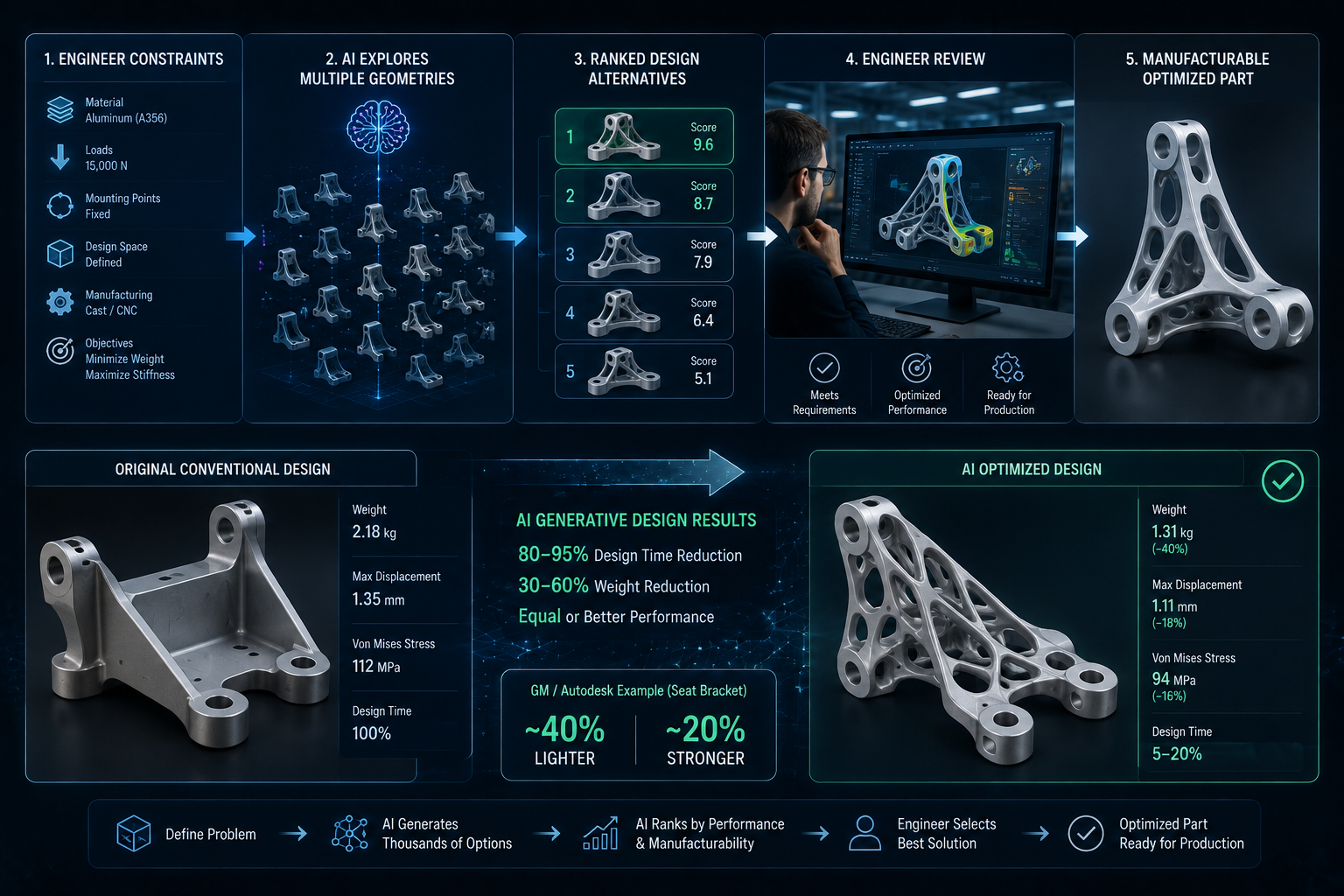
General Motors engineers used Autodesk's generative design capabilities to redesign a vehicle seat bracket. The workflow: engineers defined performance requirements (load cases, material limits, manufacturability constraints, safety factors) and let the AI generate and evaluate multiple viable design configurations against those parameters simultaneously.
The AI did not select or approve the final design. Engineers reviewed the generated alternatives, assessed feasibility, validated performance through simulation and testing, and made the final engineering decisions. The value was early-stage breadth: the system surfaced design configurations that would have taken weeks to explore manually, before the team committed to a single geometry.
The final bracket concept was approximately 40 percent lighter and 20 percent stronger than the original, with multiple separate components consolidated into a single part. Late-stage redesign was reduced because viable solutions were identified earlier in the design cycle, before tooling and supply chain decisions were locked in.
✓ 40% lighter ✓ 20% stronger ✓ Multiple components consolidated into one ✓ Reduced late-stage redesign cyclesThe constraint worth understanding is manufacturability. Generative design output often produces geometry that is optimal for performance but difficult to machine with conventional tooling. Teams working with additive manufacturing can often use the output directly. Teams working with CNC machining or casting need to apply additional constraints during the generation phase, or plan for post-generation design adjustment. This is not a reason to avoid generative design; it is a reason to configure the manufacturing constraints correctly before generating options.
AI Part Search: The High-ROI Application Most Teams Overlook
This is the category that gets the least coverage and delivers the most consistent daily value for manufacturing engineering teams. The problem it solves is specific: engineers create new part designs that already exist in their PDM vault because finding existing parts is harder than designing new ones from scratch.
At a mid-size manufacturer with five to ten years of CAD history, the vault might contain tens of thousands of part files. Searching it by part number or file name requires the engineer to already know what they are looking for. Natural language search and geometry-similarity search change the query from "find part number X" to "find a bracket with these mounting hole dimensions and approximately this profile that was used in a stainless steel application."
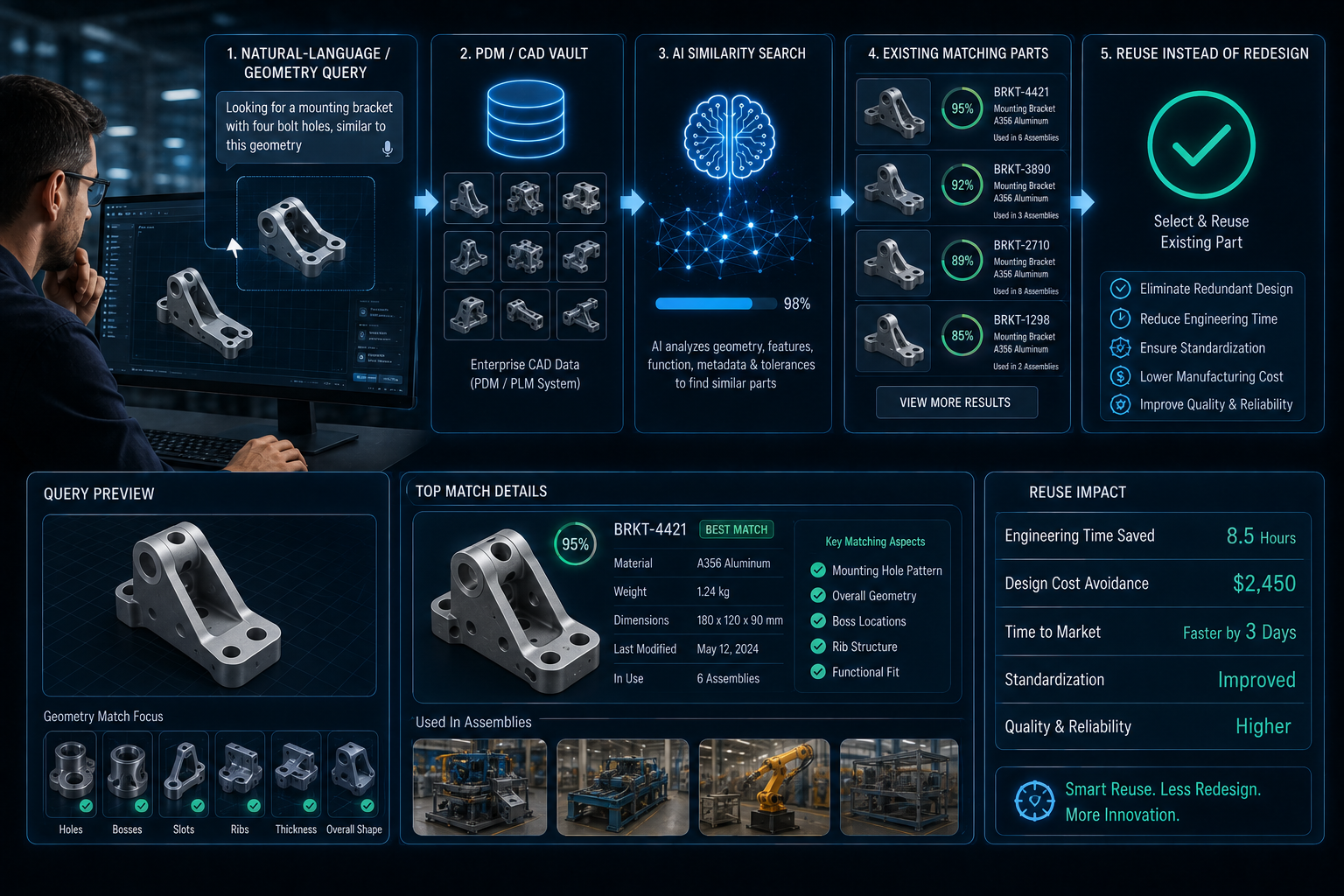
The reuse rate matters for reasons beyond engineering time. Every new part number created adds procurement complexity, increases inventory carrying cost, and extends the qualification timeline for regulated manufacturers. A CNC shop or mold-maker that reuses a proven design rather than creating a new one avoids all of that overhead. The AI part search tools with the strongest manufacturing relevance (Leo AI, Siemens Teamcenter ML search, PTC Windchill intelligence) connect directly to existing PDM systems and read CAD geometry natively, including B-rep data and feature trees, rather than relying on metadata that may be incomplete or inconsistent.
Assistive Design Review: Catching Problems While the Model Is Still Flexible
The engineering change order that surfaces three weeks before first article inspection has a fundamentally different cost than the same issue caught during initial modeling. Tooling may already be ordered. Supplier lead times may already be committed. The rework required is not just the design change itself; it is everything downstream that needs to be undone and redone.
AI assistive design review operates as a background layer during modeling. As geometry is created, the system evaluates it against known patterns from historical production data: tolerance ranges that consistently cause machining delays on similar features, geometries that increase scrap or rework in production, features that slow inspection and CMM cycle times, materials that underperform when transitioning from simulation to actual production conditions.
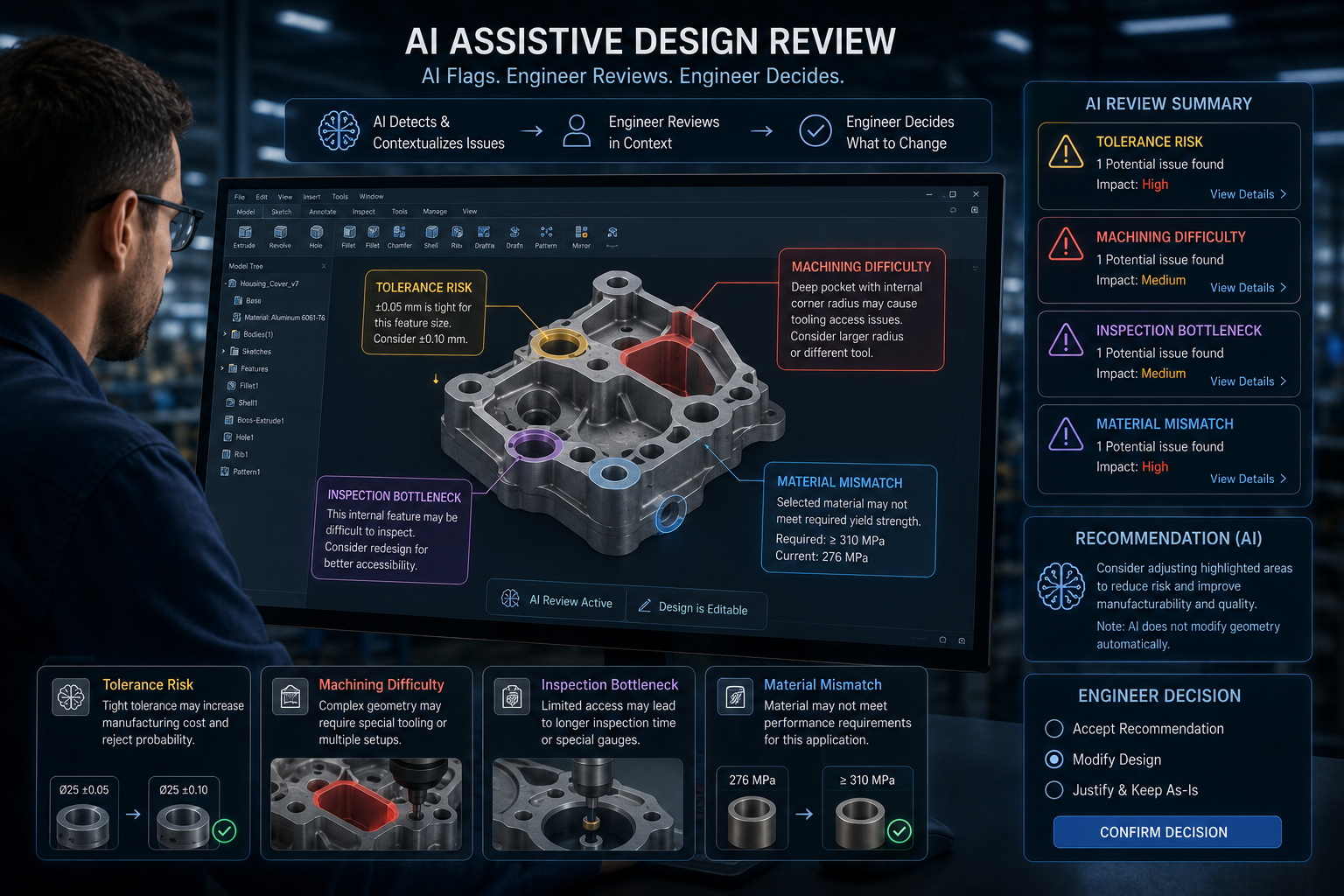
The system does not modify the design. It flags and contextualizes. An engineer sees a note that a specific tolerance range on a particular feature has correlated with extended machining setup times in 14 of the last 20 similar parts. They review, decide whether the tolerance is genuinely necessary, and either adjust or document the design intent. The judgment stays with the engineer. The pattern recognition scales across a dataset the engineer cannot hold in memory.
| Issue Type | When AI Assistive Review Catches It | When Caught Conventionally | Cost Difference |
|---|---|---|---|
| Tolerance risk | During modeling (design still flexible) | First article inspection or production trial | Hours of design adjustment vs. weeks of rework |
| Machining difficulty | During modeling (before tooling is ordered) | During tooling design or first production run | Design change vs. tooling modification cost |
| Inspection bottleneck | During modeling (datum scheme still adjustable) | During first-article CMM programming | Model edit vs. CMM program rewrite + schedule delay |
| Material mismatch | Material selection phase (before procurement) | Production trials or post-delivery failure | Material substitution vs. warranty/recall cost |
The Siemens NX and Teamcenter combination brings this capability into the PLM workflow directly, with ML-driven error detection and component suggestions available within the standard design environment. Teams already standardized on the Siemens stack can activate this layer without a separate tool. PTC Creo's AI capabilities and CoLab's knowledge graph approach offer similar functionality for teams on different PLM platforms.
Embedded Compliance: When the CAD Model Knows Its Own Rules
In most engineering organizations, compliance lives outside CAD. Material declarations, safety-critical dimension flags, revision accountability, and regulatory constraints are tracked in spreadsheets, PDF attachments, and email threads that are loosely connected to the model itself. When the model changes, the compliance documentation may or may not follow. When an auditor asks for traceability, someone spends days reconstructing a paper trail that should have been maintained automatically.
The shift that AI-connected CAD enables is moving compliance from a downstream scramble to an upstream design property. The model carries embedded metadata: material substance classifications that automatically flag regulatory constraints, safety-critical dimension markers that are preserved across revisions, design intent and change approval records tied to the geometry itself rather than stored separately.

Material metadata embedded at design time
Material selections carry regulatory classification data automatically. REACH, RoHS, or industry-specific substance restrictions are checked against the selection when it is made, not during compliance review weeks later.
Safety-critical dimensions flagged and preserved
Critical characteristics are identified during design and propagate through revisions. An accidental tolerance change on a safety-critical dimension triggers an alert rather than passing silently through the next ECO cycle.
Revision and approval records tied to geometry
Design intent, change rationale, and approval history stay with the model rather than accumulating in email chains that may or may not be archived correctly. When an AS9100 or IATF 16949 audit requires traceability, the record is in the model, not in a spreadsheet that needs to be reconstructed.
Early sustainability and cost visibility
Weight, material selection, and manufacturing process implications are visible during design, not after production planning is complete. For manufacturers tracking environmental compliance or managing material cost targets, this changes the conversation from reactive adjustment to proactive design decision.
Where Mid-Market Manufacturers Should Start
The sequence matters. Teams that jump to generative design before addressing part reuse and early issue detection tend to find that generative design produces geometry their production process cannot manufacture without significant post-processing. Teams that start with part search and assistive review build data and process habits that make generative design deployments more successful when they eventually reach that phase.
A practical starting sequence for a mid-size manufacturer:
- Audit your vault first. If your PDM contains tens of thousands of parts with incomplete metadata, AI part search will return poor results. Invest two to four weeks in metadata cleanup before enabling AI search.
- Start assistive review on new programs, not existing ones. Retrofitting AI review to in-production designs creates noise. The value is in catching issues before tooling is ordered on new programs.
- Define your manufacturability constraints before enabling generative design. The manufacturing method constraints (CNC, casting, additive) need to be configured correctly before generation. Output generated without these constraints requires extensive post-processing.
- Connect PLM before deploying compliance intelligence. Embedded compliance metadata only works if the CAD system and PLM are properly integrated. Compliance intelligence deployed on top of a disconnected PDM produces a false sense of traceability.
The firms reporting the clearest ROI from AI CAD software share one characteristic: they treated the first deployment as a data infrastructure project as much as a software project. The AI capabilities are real. They depend on data quality and system integration to deliver on the potential the vendor demonstrated in the sales process.
Ready to Assess Your CAD and PLM AI Readiness?
GrayCyan's AI Readiness Assessment maps your engineering data infrastructure, identifies the highest-value AI CAD opportunities for your specific production environment, and builds a sequenced deployment roadmap before any software investment is made.
Book an AI Readiness AssessmentFrequently Asked Questions